
Multi-PC Aggregation
Multi-PC aggregation is claude-telemetry's core differentiator. This page explains how it works and how to get the most out of it.
Why Multi-PC Matters
Anthropic's Claude Code rate limits are per account, not per machine. If you use Claude Code on your work laptop and home desktop, your combined usage counts against the same limits.
Without aggregation:
- You can't see total spending across machines
- You might hit rate limits unexpectedly because you didn't account for usage on another PC
- There's no way to know which machine is consuming the most tokens
How It Works
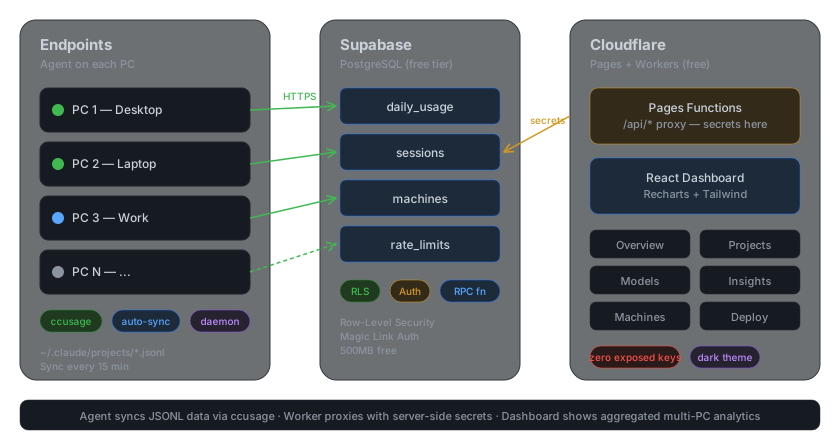
- Each PC runs its own agent — the agent calls ccusage to extract usage data from local logs
- Agents push to Supabase — each record is tagged with a
machine_id - Dashboard aggregates — queries combine data from all machines
The agent does no custom JSONL parsing — it delegates that to ccusage and focuses only on multi-PC aggregation and centralized sync.
Machine IDs
Each agent generates a unique UUID on first run, stored in ~/.cc-telemetry/config.json. This ID is immutable — it stays the same even if you rename the machine.
The machine_name field is a human-friendly label (e.g., "work-laptop", "home-desktop") that you set during setup. You can change it at any time.
Dashboard Filtering
Every dashboard page supports machine filtering:
- All Machines — the default view, shows aggregated data
- Single Machine — filter by a specific machine to see its isolated usage
- Compare — side-by-side comparison between two machines
The machine selector appears in the top navigation bar on every page.
Adding a New Machine
- Clone the repo and set up the agent (see Agent Setup)
- Run
cc-telemetry setupwith the same Supabase credentials - Give it a unique
machine_name - Run
cc-telemetry install-service
The new machine will appear in the dashboard within 15 minutes (the default sync interval).
Removing a Machine
To stop syncing from a machine:
cc-telemetry uninstall-service
cc-telemetry uninstall
Historical data from that machine remains in Supabase. To remove it:
DELETE FROM usage_data WHERE machine_id = 'your-machine-uuid';Sync Behavior
- Real-time (primary): Claude Code hooks sync data the moment a session ends — see Real-time Hooks
- Polling (backup): Daemon syncs every 60 minutes to catch anything hooks miss
- Idempotent: The agent tracks the last synced timestamp — re-syncing doesn't create duplicates
- Force re-sync: Use
cc-telemetry sync --forceto re-sync all data from scratch - Offline resilient: If the network is down, the agent retries on the next interval
- Lightweight: Only new sessions since the last sync are transmitted